Olá pessoal, td certo !
estou com o seguinte problema.
antes de começar, vou deixar aqui listado o que precisamos saber antes de achar solução.
sistema operacional : Arch Linux (instalado via script “archinstall”)
placa-mãe : Asus b760 DDR4
processador : intel core i7 12gen
placa de video: RTX 4060
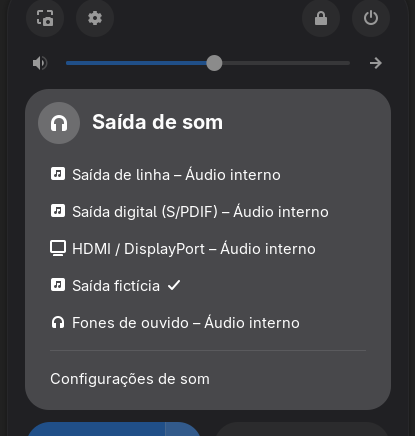
O problema está com o som, toda vez que eu inicio o sistema, tenho que trocar para saida de som HDMI da GPU, e depois voltar para o plug stereo “saida de linha” para então sair som nas minhas caixas, ou headset.
Até então ok, pesquisei e baixei o “pavucontrol” e mesmo assim, não resolveu.
Como eu fiz a instalação pelo script, o driver de som que eu instalei, foi o Pulseaudio.
O chip de som é um Realtek.
e agora surgiu um novo problema, trocar para HDMI e voltar para conexão de linha, não resolve mais, e aparece uma tal de “Saida ficticia” mesmo listando todas outras conexões.
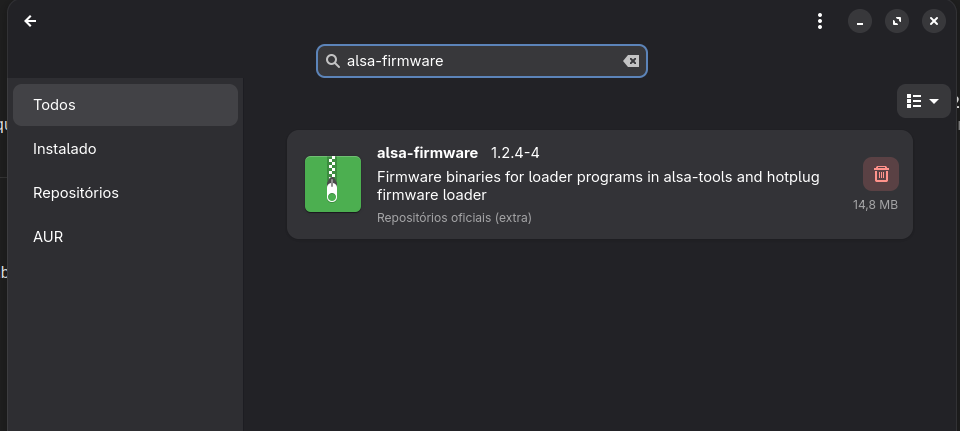
Fiz a instalação desse pacote .
mas não resolveu !
Remove unwanted configs: Remove default profiles or configurations in ~/.config/pipewire/media-session.d/ if they are causing issues. << não existe.
Veja se é pulseaudio
Troubleshooting “Dummy Output”:
- 1. Restart PulseAudio:
- Try restarting the PulseAudio daemon. You can do this with the command
pulseaudio --kill; pulseaudio --start.
- Some applications might need to be restarted to pick up the changes, like VLC.
- 2. Check Default Output Device:
- Use
pavucontrol (PulseAudio Volume Control) to see if the correct output device is selected as the default.
- If you see a muted output, try unmuting it with
pamixer -u.
- 3. Driver Issues:
- Install
sof-firmware: This can resolve issues with audio devices, especially on laptops.
- Verify ALSA modules: Ensure the
snd_hda_intel module is loaded and properly configured. You might need to add options to /etc/modprobe.d/alsa-base.conf.
- 4. PipeWire (Modern Approach):
- If you’re using a newer system (Ubuntu 24.04 and later), you might be using PipeWire instead of PulseAudio.
- Try restarting PipeWire services:
systemctl --user restart pipewire.service.
- If using PipeWire with PulseAudio, also restart
pipewire-pulse and wireplumber: systemctl --user restart pipewire-pulse wireplumber.
- 5. Configuration File Issues:
- Delete the PulseAudio configuration file:
rm -rf ~/.config/pulse.
- After removing the file, make sure you restart PulseAudio.
- 6. Kernel Issues:
- Some kernel versions have known issues with audio drivers. Consider upgrading or downgrading your kernel to see if that helps.
- 7. Hardware Detection:
- If you’ve recently installed new hardware, ensure the drivers are correctly installed and configured.
- In some cases, you might need to use a specific audio profile for your hardware (e.g.,
output:analog-stereo).
Tentei essas possiveis soluções, mas nada adiantou, agora estou tentando fazer o downgrade de kernel.
Resolvi, reinstalei o meu Arch, dessa vez com drive Pipeware e agora funciona normal.
Recomendo a todos que tem hardware mais novo, usem Pipeware como sistema de som.
1 curtida
Este tópico foi fechado automaticamente 3 dias depois da última resposta. Novas respostas não são mais permitidas.