Instalei, porém continua sem funcionar.
Você precisa colocar ele para iniciar junto com o sistema.
O driver específico do adaptador não.
Não consigo encontrá-lo nas configurações para colocá-lo para iniciar com o sistema.
Tentou sudo systemctl enable hostapd.service?
Synchronizing state of hostapd.service with SysV service script with /lib/systemd/systemd-sysv-install.
Executing: /lib/systemd/systemd-sysv-install enable hostapd
Failed to enable unit: Unit file /etc/systemd/system/hostapd.service is masked.
Rode esse comando e vê se dar algum erro: nmcli device wifi hotspot con-name teste ssid teste band bg password teste
Se der me mostre o erro.
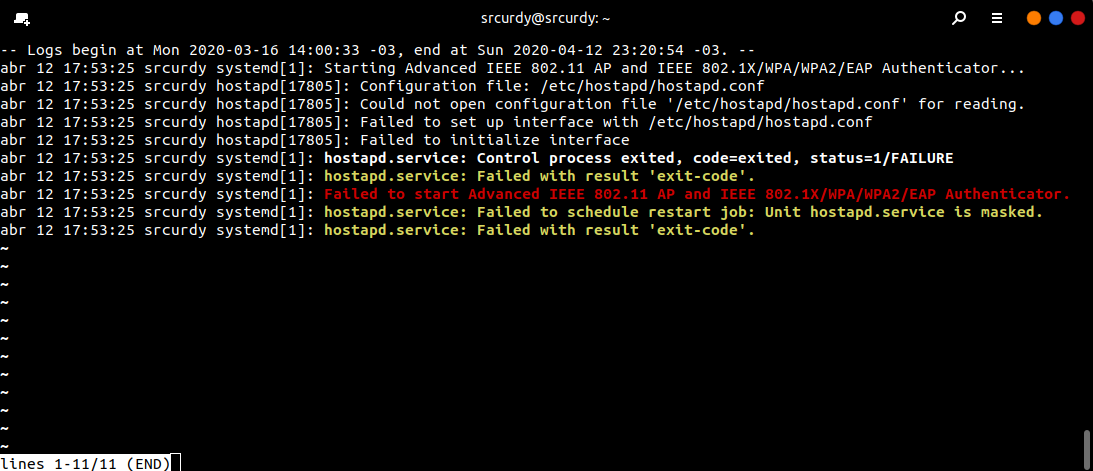
Desculpe a demora… Tente sudo journalctl -u hostapd.
Talvez esse vídeo ajude: Create Wifi Hotspot On Linux using network manager - YouTube
Deu o seguinte erro:
Erro: o dispositivo “wlx40a5ef0eb432” não oferece suporte aos modos AP e Ad-Hoc.
rode esses comandos: iw list, lspci, lsusb
envia o resultado deles.
Wiphy phy0
max # scan SSIDs: 4
max scan IEs length: 2257 bytes
max # sched scan SSIDs: 0
max # match sets: 0
max # scan plans: 1
max scan plan interval: -1
max scan plan iterations: 0
RTS threshold: 2347
Retry short limit: 7
Retry long limit: 4
Coverage class: 0 (up to 0m)
Supported Ciphers:
* WEP40 (00-0f-ac:1)
* WEP104 (00-0f-ac:5)
* TKIP (00-0f-ac:2)
* CCMP-128 (00-0f-ac:4)
* CCMP-256 (00-0f-ac:10)
* GCMP-128 (00-0f-ac:8)
* GCMP-256 (00-0f-ac:9)
Available Antennas: TX 0 RX 0
Supported interface modes:
* managed
* monitor
Band 1:
Capabilities: 0x6c
HT20
SM Power Save disabled
RX HT20 SGI
RX HT40 SGI
No RX STBC
Max AMSDU length: 3839 bytes
No DSSS/CCK HT40
Maximum RX AMPDU length 65535 bytes (exponent: 0x003)
Minimum RX AMPDU time spacing: 16 usec (0x07)
HT TX/RX MCS rate indexes supported: 0-7, 32
Bitrates (non-HT):
* 1.0 Mbps
* 2.0 Mbps
* 5.5 Mbps
* 11.0 Mbps
* 6.0 Mbps
* 9.0 Mbps
* 12.0 Mbps
* 18.0 Mbps
* 24.0 Mbps
* 36.0 Mbps
* 48.0 Mbps
* 54.0 Mbps
Frequencies:
* 2412 MHz [1] (20.0 dBm)
* 2417 MHz [2] (20.0 dBm)
* 2422 MHz [3] (20.0 dBm)
* 2427 MHz [4] (20.0 dBm)
* 2432 MHz [5] (20.0 dBm)
* 2437 MHz [6] (20.0 dBm)
* 2442 MHz [7] (20.0 dBm)
* 2447 MHz [8] (20.0 dBm)
* 2452 MHz [9] (20.0 dBm)
* 2457 MHz [10] (20.0 dBm)
* 2462 MHz [11] (20.0 dBm)
* 2467 MHz [12] (20.0 dBm) (no IR)
* 2472 MHz [13] (20.0 dBm) (no IR)
* 2484 MHz [14] (20.0 dBm) (no IR)
Supported commands:
* new_interface
* set_interface
* new_key
* start_ap
* new_station
* new_mpath
* set_mesh_config
* set_bss
* authenticate
* associate
* deauthenticate
* disassociate
* join_ibss
* join_mesh
* set_tx_bitrate_mask
* frame
* frame_wait_cancel
* set_wiphy_netns
* set_channel
* set_wds_peer
* probe_client
* set_noack_map
* register_beacons
* start_p2p_device
* set_mcast_rate
* connect
* disconnect
* set_qos_map
* set_multicast_to_unicast
Supported TX frame types:
* IBSS: 0x00 0x10 0x20 0x30 0x40 0x50 0x60 0x70 0x80 0x90 0xa0 0xb0 0xc0 0xd0 0xe0 0xf0
* managed: 0x00 0x10 0x20 0x30 0x40 0x50 0x60 0x70 0x80 0x90 0xa0 0xb0 0xc0 0xd0 0xe0 0xf0
* AP: 0x00 0x10 0x20 0x30 0x40 0x50 0x60 0x70 0x80 0x90 0xa0 0xb0 0xc0 0xd0 0xe0 0xf0
* AP/VLAN: 0x00 0x10 0x20 0x30 0x40 0x50 0x60 0x70 0x80 0x90 0xa0 0xb0 0xc0 0xd0 0xe0 0xf0
* mesh point: 0x00 0x10 0x20 0x30 0x40 0x50 0x60 0x70 0x80 0x90 0xa0 0xb0 0xc0 0xd0 0xe0 0xf0
* P2P-client: 0x00 0x10 0x20 0x30 0x40 0x50 0x60 0x70 0x80 0x90 0xa0 0xb0 0xc0 0xd0 0xe0 0xf0
* P2P-GO: 0x00 0x10 0x20 0x30 0x40 0x50 0x60 0x70 0x80 0x90 0xa0 0xb0 0xc0 0xd0 0xe0 0xf0
* P2P-device: 0x00 0x10 0x20 0x30 0x40 0x50 0x60 0x70 0x80 0x90 0xa0 0xb0 0xc0 0xd0 0xe0 0xf0
Supported RX frame types:
* IBSS: 0x40 0xb0 0xc0 0xd0
* managed: 0x40 0xd0
* AP: 0x00 0x20 0x40 0xa0 0xb0 0xc0 0xd0
* AP/VLAN: 0x00 0x20 0x40 0xa0 0xb0 0xc0 0xd0
* mesh point: 0xb0 0xc0 0xd0
* P2P-client: 0x40 0xd0
* P2P-GO: 0x00 0x20 0x40 0xa0 0xb0 0xc0 0xd0
* P2P-device: 0x40 0xd0
software interface modes (can always be added):
* monitor
interface combinations are not supported
HT Capability overrides:
* MCS: ff ff ff ff ff ff ff ff ff ff
* maximum A-MSDU length
* supported channel width
* short GI for 40 MHz
* max A-MPDU length exponent
* min MPDU start spacing
Device supports TX status socket option.
Device supports HT-IBSS.
Device supports SAE with AUTHENTICATE command
Device supports low priority scan.
Device supports scan flush.
Device supports AP scan.
Device supports per-vif TX power setting
Driver supports full state transitions for AP/GO clients
Driver supports a userspace MPM
Device supports configuring vdev MAC-addr on create.
Supported extended features:
* [ RRM ]: RRM
* [ FILS_STA ]: STA FILS (Fast Initial Link Setup)
* [ CQM_RSSI_LIST ]: multiple CQM_RSSI_THOLD records
* [ CONTROL_PORT_OVER_NL80211 ]: control port over nl80211
00:00.0 Host bridge: Intel Corporation Xeon E3-1200 v6/7th Gen Core Processor Host Bridge/DRAM Registers (rev 05)
00:01.0 PCI bridge: Intel Corporation Xeon E3-1200 v5/E3-1500 v5/6th Gen Core Processor PCIe Controller (x16) (rev 05)
00:08.0 System peripheral: Intel Corporation Xeon E3-1200 v5/v6 / E3-1500 v5 / 6th/7th/8th Gen Core Processor Gaussian Mixture Model
00:14.0 USB controller: Intel Corporation 200 Series/Z370 Chipset Family USB 3.0 xHCI Controller
00:16.0 Communication controller: Intel Corporation 200 Series PCH CSME HECI #1
00:17.0 SATA controller: Intel Corporation 200 Series PCH SATA controller [AHCI mode]
00:1b.0 PCI bridge: Intel Corporation 200 Series PCH PCI Express Root Port #21 (rev f0)
00:1c.0 PCI bridge: Intel Corporation 200 Series PCH PCI Express Root Port #5 (rev f0)
00:1c.5 PCI bridge: Intel Corporation 200 Series PCH PCI Express Root Port #6 (rev f0)
00:1c.6 PCI bridge: Intel Corporation 200 Series PCH PCI Express Root Port #7 (rev f0)
00:1c.7 PCI bridge: Intel Corporation 200 Series PCH PCI Express Root Port #8 (rev f0)
00:1d.0 PCI bridge: Intel Corporation 200 Series PCH PCI Express Root Port #9 (rev f0)
00:1d.1 PCI bridge: Intel Corporation 200 Series PCH PCI Express Root Port #10 (rev f0)
00:1d.2 PCI bridge: Intel Corporation 200 Series PCH PCI Express Root Port #11 (rev f0)
00:1d.3 PCI bridge: Intel Corporation 200 Series PCH PCI Express Root Port #12 (rev f0)
00:1f.0 ISA bridge: Intel Corporation 200 Series PCH LPC Controller (B250)
00:1f.2 Memory controller: Intel Corporation 200 Series/Z370 Chipset Family Power Management Controller
00:1f.3 Audio device: Intel Corporation 200 Series PCH HD Audio
00:1f.4 SMBus: Intel Corporation 200 Series/Z370 Chipset Family SMBus Controller
01:00.0 VGA compatible controller: Advanced Micro Devices, Inc. [AMD/ATI] Ellesmere [Radeon RX 470/480/570/570X/580/580X/590] (rev ef)
01:00.1 Audio device: Advanced Micro Devices, Inc. [AMD/ATI] Ellesmere HDMI Audio [Radeon RX 470/480 / 570/580/590]
03:00.0 Ethernet controller: Realtek Semiconductor Co., Ltd. RTL8111/8168/8411 PCI Express Gigabit Ethernet Controller (rev 0c)
Bus 002 Device 001: ID 1d6b:0003 Linux Foundation 3.0 root hub
Bus 001 Device 003: ID 1a2c:2124 China Resource Semico Co., Ltd USB Keyboard
Bus 001 Device 002: ID 0bda:b720 Realtek Semiconductor Corp. 802.11n WLAN Adapter
Bus 001 Device 001: ID 1d6b:0002 Linux Foundation 2.0 root hub
Parece que esse adaptador não suporta hotspot.
esse artigo explica melhor: Ubuntu — How to setup a wi-fi hotspot (access point mode) | by @rnab | Medium
Na verdade suporta sim, utilizo ele no Windows e funciona normalmente.
Então, O driver que ele está usando que não tem suporte. Para ver qual driver ele está usando, rode: lsmod, lsusb -t
Talvez se instalar este módulo funcione: rtl8723bu-master-custom.zip - Google Drive
Eu fiz o script para facilitar a instalação.
Execute o arquivo install.sh no terminal para instalar o módulo.
Para desinstalar: install.sh uninstall